With macOS Tahoe, Apple came with quite a few cosmetic changes in the UI.
Some love the changes, some hate it, and some do not care either way.
The one thing that really annoyed me, besides Tahoe feeling a little sluggish and some of those cosmetic bugs, was the “squircle jail” applied to application icons that do not seem to match Apple’s new icon design desires, where a grey squircle was drawn behind the icons that used to look great.
To fix this, there is not a single option in the OS to be found to undo this unwanted change.
So I ended up figuring out the “new” icon, and how to override it, is all controlled with Extended Attributes and created a little application, SquircleNoMore, to strip those ugly icons and reset applications to their native icon.
Reset the ugly macOS Tahoe “Squircle Jail” icons
Not sure what Apple UI designer were thinking: Change the really nice application icons in macOS with these nasty looking icons?
What is up with that, why would anyone want this. Even if the intend was to “force” developers to adhere to the new Human Interface Guidelines (App Icons guidelines).
There would be no reason to ruin the view like this (there are more things when it comes to Tahoe’s UI design I can complain about, but I’ll stick to the icons for now).
That’s why I wrote SquircleNoMore for myself … here sharing it with you.
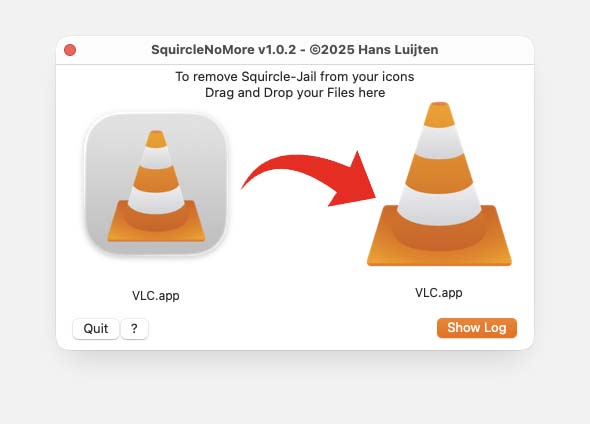
SquircleNoMore
What does SquircleNoMore do?
The general idea is to drop an application on SquircleNoMore, and if possible the icon will be update.

SquircleNoMore – Tahoe Squircle back to Normal Iconsq
Whatever icon or icons you drop on it, SquircleNoMore will first select only those that are applications (so called .App bundles) or an Aliases pointing to applications.
If it is an Alias, for an .App bundle, then it will locate the original .App bundle.
Next it will try to determine the proper icon, and if a proper icon has been found it will be applied.
Once the icon or icons have been updated, Finder and Dock will be reloaded so they reflect the proper icons.
That’s all there is to it.
System or App Store applications cannot be Updated with SquircleNoMore!
MacOS will not allow applications to change the icon of applications that came with macOS or came from the App Store.
The same goes for iOS applications on Apple Silicon Macs – they do come out the App Store typically of course.
Technical info how SquircleNoMore works
The more technical, for those interested:
SquircleNoMore will first see if the file or files you dropped on it are either and .App bundle (special directories ending with the extension “.app”) or an alias.
For an alias it will try to find the original file, to update this one as well, but only if it is pointing to an .App bundle as well.
Next, for those files (more correct: directories) that qualify, it will determine, based on the Info.plist file (someapplication.app / Contents / Info.plist) what icon the original developer had in mind. Quite often these are stored in the Resources directory (someapplication.app / Contents / Resources / AppIcon.icns).
If an icon is mentioned in the Info.plist file, SquircleNoMore will then verify if it exists.
Some developer do not include the “.icns” extension when mentioning the icon in the Info.plist file under the CFBundleIconFile key.
SquircleNoMore will find those as well.
However, some developers do not even mention any icon in the Info.plist file.
In those case when the icon file does not exist, SquircleNoMore will try to see if a same or similar ICNS files can be found in the Resources directory.
If an icon is found: it will be applied through means of Extended Attributes.
A previous existing icon in Extended Attributes will be remove prior to adding the proper icon.
Installing SquircleNoMore
This is done the usual Apple way: Download the DMG, double click it, and in the window that opens move SquircleNoMore to the Applications directory.
Keep in mind: SquircleNoMore may need Full Disk Access (you will be asked to optionally enable this if it was not enabled).
Privacy note: SquircleNoMore will not call home, will not access any private information, and will not even pollute your system with random files.
Download
The download is free – it is a universal application for Apple Silicon and Intel processor, so modern Macs should work just find with this.
The application has been signed an notarized.
Download - squirclenomore-v1.0.3-macos.dmg
Uninstalling SquircleNoMore
Simply drag SquircleNoMore from your Applications directory to the Trashcan.
SquircleNoMore does not store or install anything on your system that may need to be removed (or needed) once it did its job.

Comments
There are 3 comments. You can read them below.
You can post your own comments by using the form below, or reply to existing comments by using the "Reply" button.
Thanks for the app – fixed the icons for me! (Tahoe 26.2)
HollyG
Thank you HollyG for taking the time to post a Thank-You!
Have a great 2026!
Hans
UPDATE 1.0.3
Hans